A Gmail reminder that only fires if they do not reply
You sent the proposal. You need an answer by Thursday. Now you are carrying that in your head, or starring the email and hoping you look at your stars. QuillReply carries it instead, and only bothers you if it has to.
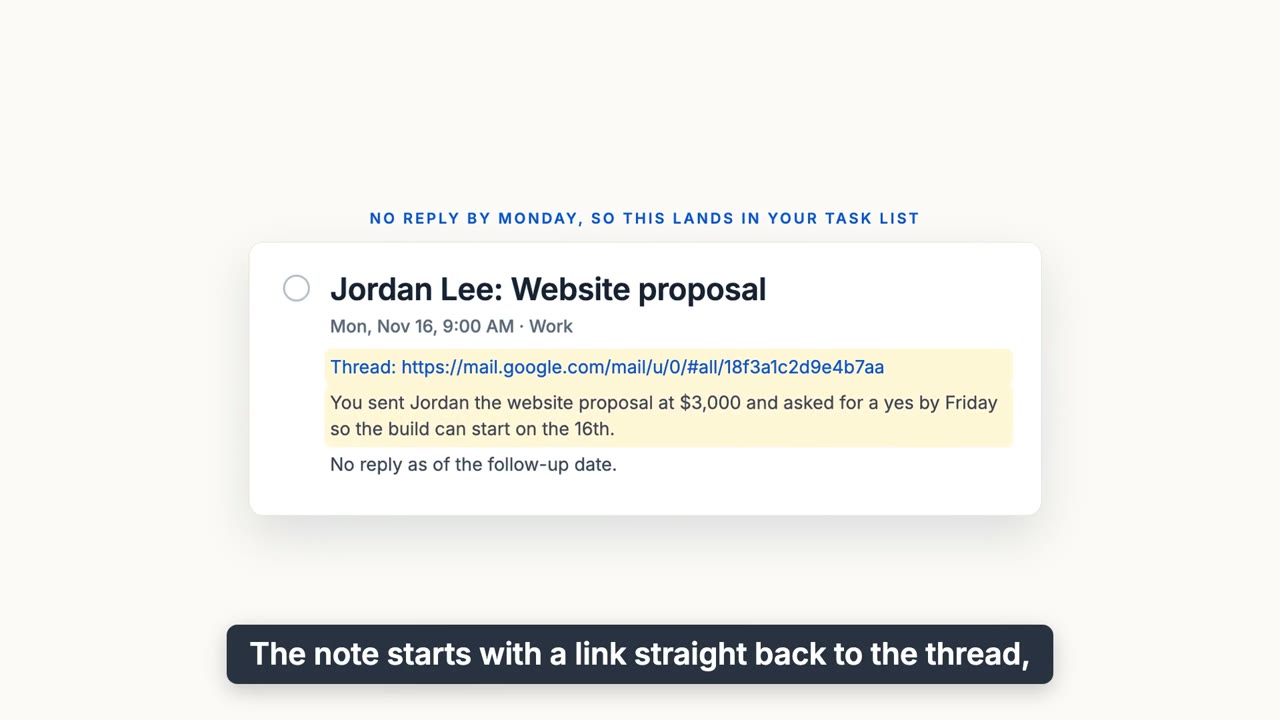
What lands when nobody replied: who and what, a link back to the thread, and a short summary.
How it works
- Pick a day next to Send. "In two days, only if they have not replied." Then send it like you normally would. You can also arm it afterwards from the open thread.
- If they reply, nothing happens. On the day you chose, QuillReply re-reads that one conversation in your browser. This runs while Gmail is open; if Gmail is closed that day, the check runs the next time you open it. A real reply means the reminder quietly stands down and you never hear about it.
- If they go quiet, it lands in your task list. Apple Reminders, Microsoft To Do, Todoist or Basecamp, titled with who and what ("Jordan Lee: Website proposal"), with a link straight back to the thread and a one-line summary of the email you sent.
- Nothing is ever sent for you. The reminder tells you who you are waiting on and why. Whether and how to follow up is your call.
It knows a reply from noise
Your own chase-up does not count as a reply. Neither does their out-of-office. The reminder only stands down when the other person actually wrote back.
You can always see what you are waiting on
Open any conversation and the toolbar tells you whether a follow-up is armed on it, so you never have to wonder. When one comes due with no reply, that spot turns amber. The quill in your browser toolbar counts everything you are waiting on, and the Ledger behind it lists every open reminder and everything that cleared.
Why it does not need a key to your mailbox
Most reply trackers watch your mail from a server, which means holding a key to your whole mailbox. QuillReply has no Gmail API access, and our servers never hold a key to your mailbox. The "did they reply" check runs in your own browser, on that one thread, and sends nothing to our servers. The one thing sent is the email you just wrote, once, when you arm the follow-up, so its one-line summary can be written. It is then discarded.
Your browser will say QuillReply can read mail.google.com: that is how any extension puts buttons inside Gmail, and it reads a message only when you click.
Questions
Does QuillReply send the follow-up email for me?
No. It reminds you, in your own task app, with a link back to the thread. Nothing is ever sent automatically.
What counts as a reply?
A message from the other person in the same thread. Your own chase-up does not count, and neither does an out-of-office autoreply.
Where does the reminder show up?
In the task manager you already use: Apple Reminders, Microsoft To Do, Todoist or Basecamp, with a link back to the Gmail thread.
Does it need access to my Gmail account?
No. QuillReply has no Gmail API access, and our servers never hold a key to your mailbox. It reads only the email you act on, in your own browser, and checks for replies the same way.
Can I set a reminder after I have already sent the email?
Yes. Open the thread and arm it from the toolbar.
Stop keeping a mental list of who owes you an answer
Thirty free actions to try it, one time and not per month. No card. Pro is $3.99 a month or $39.99 a year, unlimited, across all your Gmail accounts.