Send Gmail to Microsoft To Do, with a real title and due date
Gmail on one side, Microsoft To Do on the other, and nothing connecting them but copy and paste. QuillReply puts an Add a task button inside Gmail that files straight into the To Do list you choose.
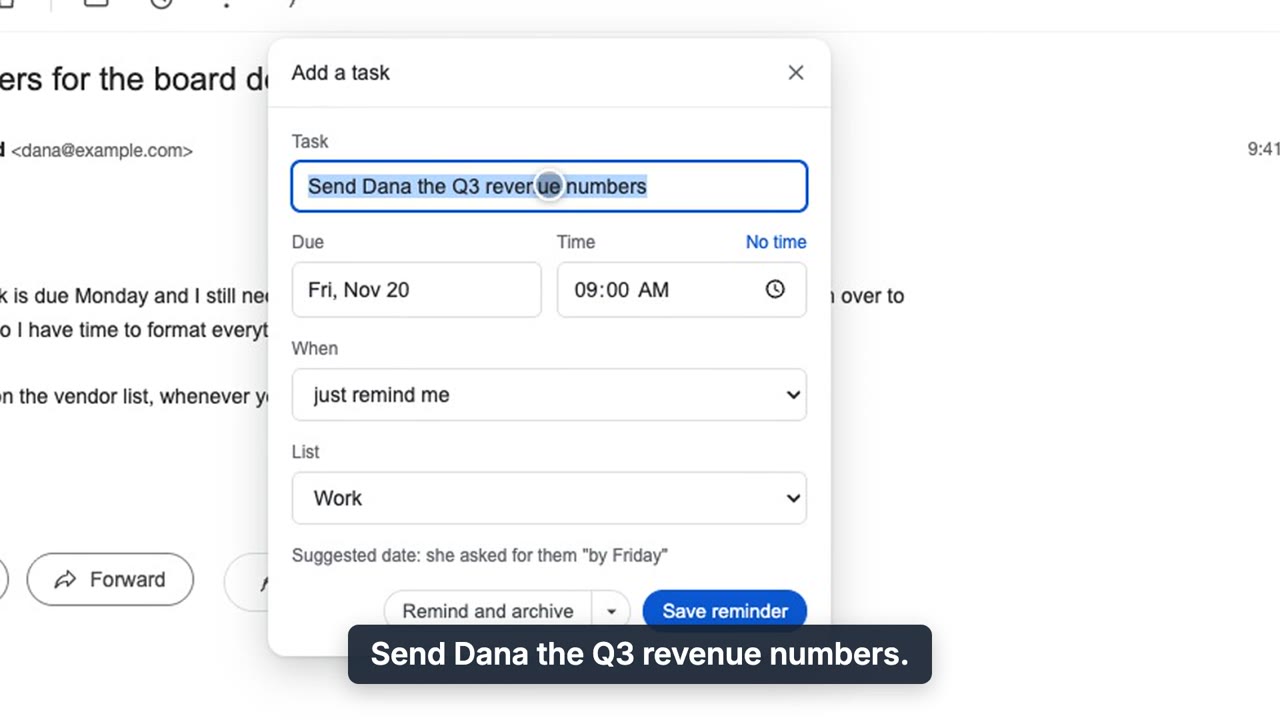
Add a task: the title and due date are suggested from the email, with the reason shown.
What lands in To Do
- A task you would have written. Suggested from the email, not the subject line. "RE: Q3" becomes "Send Dana the Q3 numbers."
- A due date and time. Pulled from what the email actually asks, with the reason shown so you can check it.
- The list you pick. Any of your To Do lists.
- A link back to the thread. Open the task, click once, you are in the email.
Personal or work account, either works
Connect with the Microsoft sign-in you already use for To Do, personal or work. There is nothing to set up in Azure. The last step of connecting passes through our server for a moment; the token is then kept in your browser, and we never store it.
It syncs the way To Do always does, so the task is on your phone without QuillReply needing to be there.
Gmail for mail, To Do for tasks
Plenty of people run a personal Gmail and a Microsoft work account, or keep their tasks in To Do at work. QuillReply does not ask you to pick one ecosystem. All your Gmail accounts are on one subscription, and every task links back to the right mailbox.
Plus follow-up reminders
The same extension sets reminders that only fire if nobody replies, and they land in To Do too. Nothing is ever sent for you.
Questions
Does it work with a work or school Microsoft account?
It works with personal and work Microsoft accounts. Some organizations restrict third-party apps; if yours does, your IT admin decides.
Do I need to register an app in Azure or paste a secret?
No. Press Connect, sign in to Microsoft, approve. That is the whole setup.
Will the task show up on my phone?
Yes. It is a normal Microsoft To Do task, so it syncs to the To Do app like any other.
Does QuillReply read my mailbox?
No. It has no Gmail API access, and our servers never hold a key to your mailbox. Your browser will say QuillReply can read mail.google.com: that is how any extension puts buttons inside Gmail, and it reads a message only when you click.
Your Gmail, your To Do list, one click apart
Thirty free actions to try it, one time and not per month. No card. Pro is $3.99 a month or $39.99 a year, unlimited, across all your Gmail accounts.