Gmail to Todoist, with the due date already filled in
Forwarding an email into Todoist usually gets you a task called "Fwd: RE: Q3" with no date. QuillReply reads the email you are looking at and writes the task you would have written yourself.
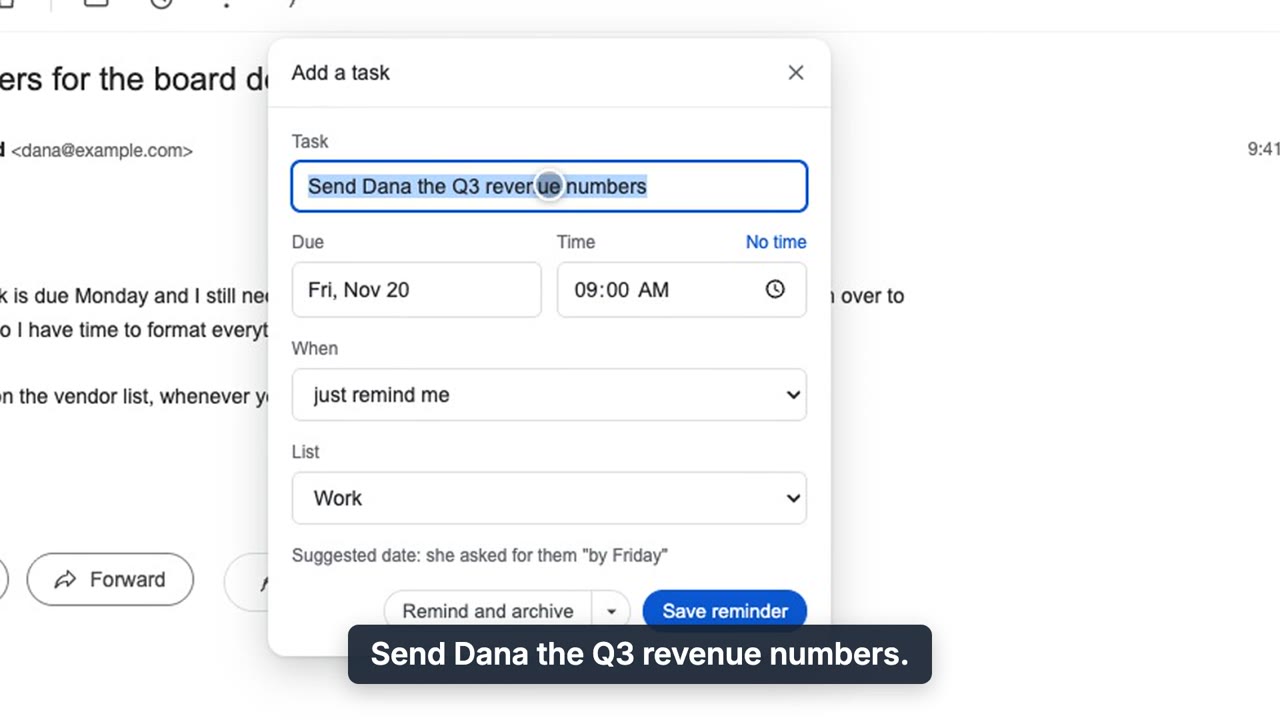
Add a task: the title and due date are suggested from the email, with the reason shown.
What lands in Todoist
| Title | A real task. "RE: Q3" becomes "Send Dana the Q3 numbers." |
|---|---|
| Due date | Suggested from the email itself, with time of day. "Can you get them to me by Friday" becomes Friday, and the reason is shown so you can judge it before saving. |
| Project | Your Todoist Inbox. Add-only access cannot see your projects, so the Inbox is where every task lands. |
| Link back | Every task carries a link straight to the Gmail thread it came from. |
Connecting Todoist takes one click
In QuillReply's settings, press Connect next to Todoist and approve. No API token to paste, no developer account. QuillReply asks Todoist only for permission to add tasks, so Todoist's own consent screen tells you it cannot read anything. Your Todoist token is kept in your browser; we never store it.
Tip: if you are not already logged in to Todoist, open it in a normal tab and log in first. Then Connect is a single click.
Save and archive in the same click
File the task and archive the email together. The email leaves your inbox, and the Todoist task is your scheduled way back to it.
It also follows up for you
Waiting on someone? Set a reminder next to Send that only fires if they do not reply. If they go quiet, the follow-up lands in Todoist like any other task. If they answer, it stands down and you never hear about it. How follow-up reminders work.
Questions
Does QuillReply need my Todoist API token?
No. You connect with one click through Todoist's own sign-in. QuillReply asks only for permission to add tasks, and the token is kept in your browser.
Can QuillReply read my Todoist tasks?
No. It requests add-only access, so it cannot read your projects' tasks.
Does it set a due date and time?
Yes. It suggests both from what the email says, shows you why, and you can change it before saving.
Does it read my whole inbox?
No. QuillReply has no Gmail API access, and our servers never hold a key to your mailbox. Your browser will say QuillReply can read mail.google.com: that is how any extension puts buttons inside Gmail, and it reads a message only when you click.
Get email out of your inbox and into Todoist
Thirty free actions to try it, one time and not per month. No card. Pro is $3.99 a month or $39.99 a year, unlimited, across all your Gmail accounts.