Gmail to Apple Reminders, without ever giving up your Apple ID
Apple Reminders is where a lot of people actually keep their life. It is also the hardest place for a Gmail tool to reach, which is why most of them either skip it or ask for your iCloud password. QuillReply does neither.
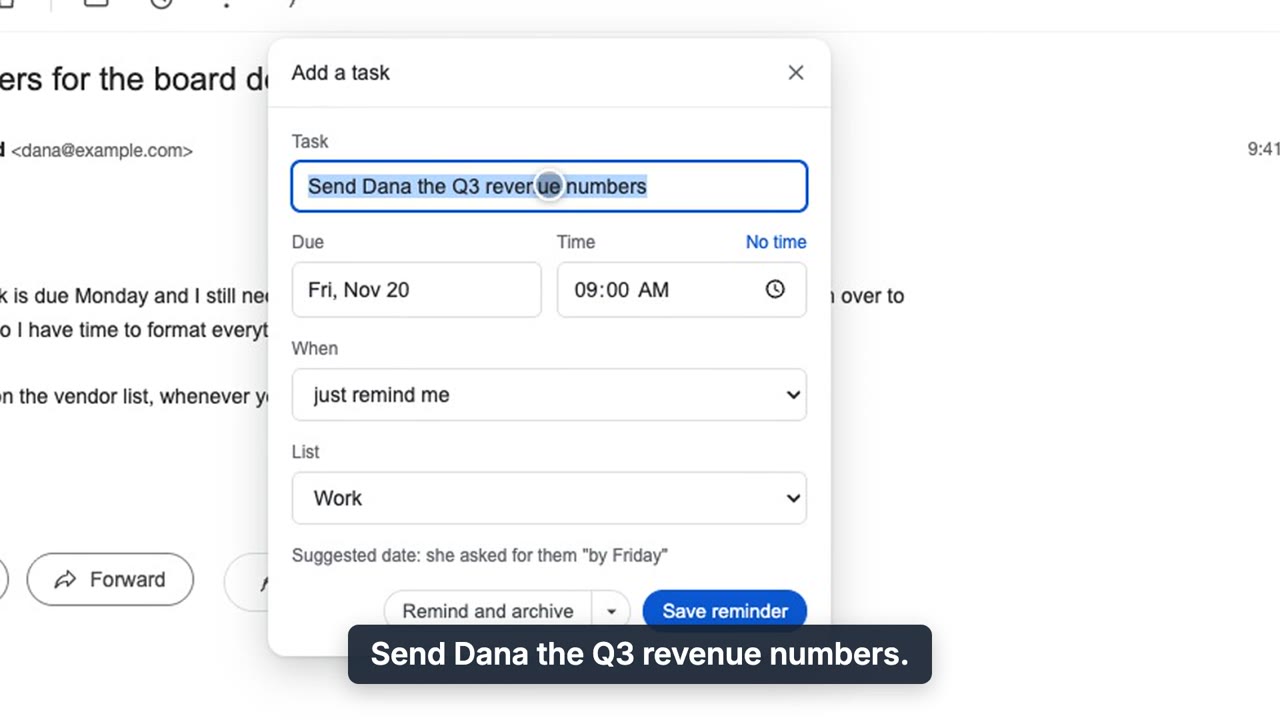
Add a task: the title and due date are suggested from the email, with the reason shown.
Why this is usually hard
Apple gives websites no way to write to Reminders. The only routes are code running on your own device, or your Apple ID, which is a key that also opens your Mail, Contacts and Calendar. We will never ask for it.
How QuillReply does it
| Your setup | What to use |
|---|---|
| You have a Mac | QuillReply for Mac, a free menu-bar helper. Install, pair from the extension, done. Reminders then sync to your iPhone through iCloud like any other. |
| Windows or Chromebook, plus an iPhone | The free iPhone Shortcut. It files your reminders on the phone a few times a day, automatically. |
| A Mac that is often closed | Both. Whichever device checks in first files the reminder, once. |
What lands in Reminders
- A real task title, suggested from the email ("Send Dana the Q3 numbers," not "RE: Q3").
- A due date including time of day, with the reason shown before you save.
- The list you choose. If that list is missing, the helper refuses and says so rather than filing it somewhere wrong.
- A link straight back to the Gmail thread.
What we hold, plainly
Apple Reminders is the one destination we queue for, because the reminder has to wait for your device. We keep its title and note only until your device confirms it created the reminder, or 30 days if no device ever does. The helper holds one credential: a token that reads your reminder queue and nothing else.
Also: follow-ups that land in Reminders
Set a reminder that only fires if they do not reply. If they go quiet, it shows up in Apple Reminders titled with who and what.
Questions
Do I need a Mac?
No. Without a Mac, a free iPhone Shortcut files the reminders on your phone. With a Mac, the free menu-bar app does it.
Will QuillReply ask for my Apple ID or iCloud password?
Never. Reminders are written on your own device, so no Apple credential is needed.
Does the reminder keep the time, not just the date?
Yes. Apple Reminders gets a real due date including time of day.
What does the Mac app cost?
Nothing. It is part of QuillReply on every plan, including the free one.
Reminders where you already look for them
Thirty free actions to try it, one time and not per month. No card. Pro is $3.99 a month or $39.99 a year, unlimited, across all your Gmail accounts.